
Knowledgebase
Dealing with "Domain has exceeded the max defers and failures per hour" error message Print this Article
At MassarCloud we track the email messages delivery status to make sure that you send to valid e-mail addresses, and if it happens that the process of sending a message to wrong or non-existent e-mail addresses is repeated several times per hour, our protection software will temporarily prevent you From sending emails to protect against flooding or classifying our email servers as spam.
Therefore if you try to send emails, and the process of sending the message return to you with an error "The domain EXAMPLE.COM has exceeded the maximum number of delays and failures per hour" with the link of your instead of EXAMPLE.COM in the previous text, that means your site is temporarily prohibited from sending E-mail messages because you have exceeded the maximum number of times sending e-mail messages to wrong addresses per hour. Assuming it, you should wait until an hour has passed, and then try again later.
Note that if the temporary ban on sending is applied to your site, even if you try to send to valid addresses, the sending process will be rejected.
When the transmission fails and the previous error text returns to you at the beginning, you must make sure that there is no abuse of service or an attempt by one of your employees to send random messages to incorrect addresses or the existence of a security breach that led to the leakage and misuse of one of your email accounts.
To perform a check to see the e-mail messages that your site has sent and the status of the messages, log into your site's hosting control panel (CPanel) and then from the e-mail options, choose Track Delivery as shown in the following image:
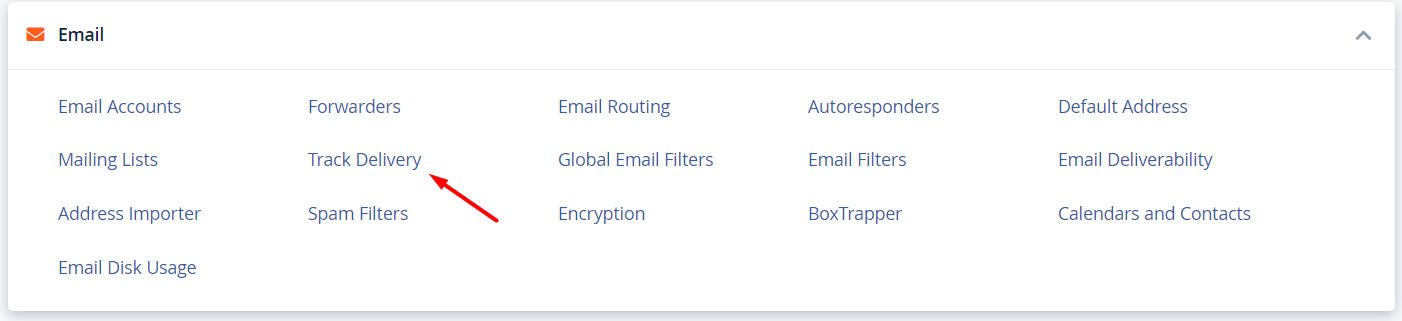
It will show you a list of e-mail messages for your site, and you will be able to filter the messages according to the status and know the sent addresses, and thus you can specify the account that is based on sending the messages. It should be noted that only the basic information about the messages can be viewed and their content cannot be known.
If you see an abnormal use of an account or sending to unfamiliar addresses, immediately change the password of the affected account or the sender, to ensure that there is no abuse in the use of the service.
for of any inquiries, or if the problem persists, please contact us.
Was this answer helpful?
Related Articles
نقوم في مسار كلاود بتقديم شهادات الحماية SSL مجانا...
بعد مرور 10 ايام على انتهاء مساحة استضافة اي موقع...
نقوم في مسار كلاود كمنشأة سعودية وتلبية لاحتياجات...
